SitRepMapper was designed specifically for the SitRepNet concept, with situation and status report information displayed on a detailed map, along with detailed and summary text reports that put it all together; Time Lapse Mode gives a visual presentation of a developing situation. It has no internet connection during use. SitRepMapper has many of the features of JS8Spotter. It trades flexibility for EmComm focus, and adds high-resolution mapping.
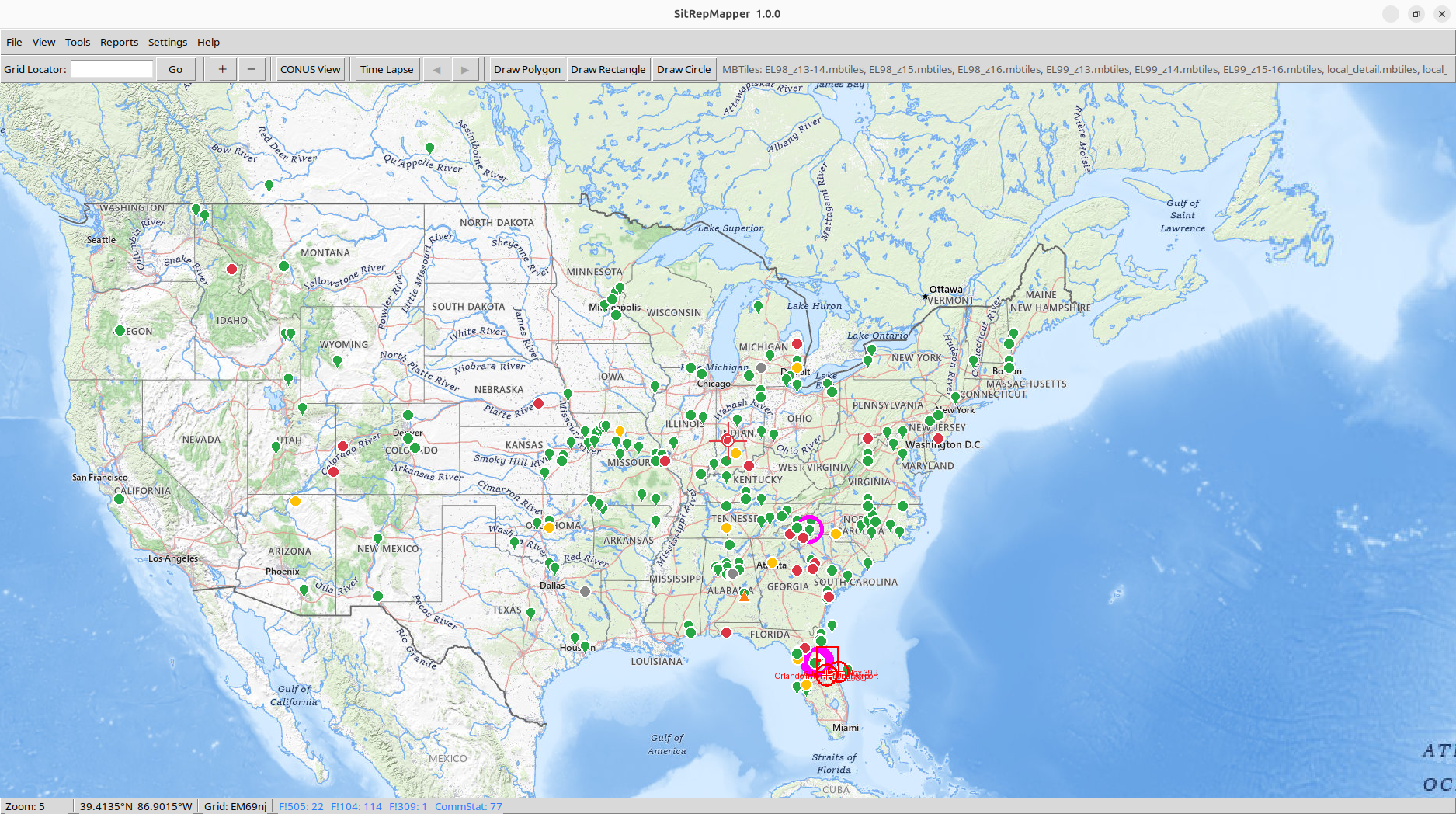
SitRepMapper – CONUS view (Click image for high resolution)
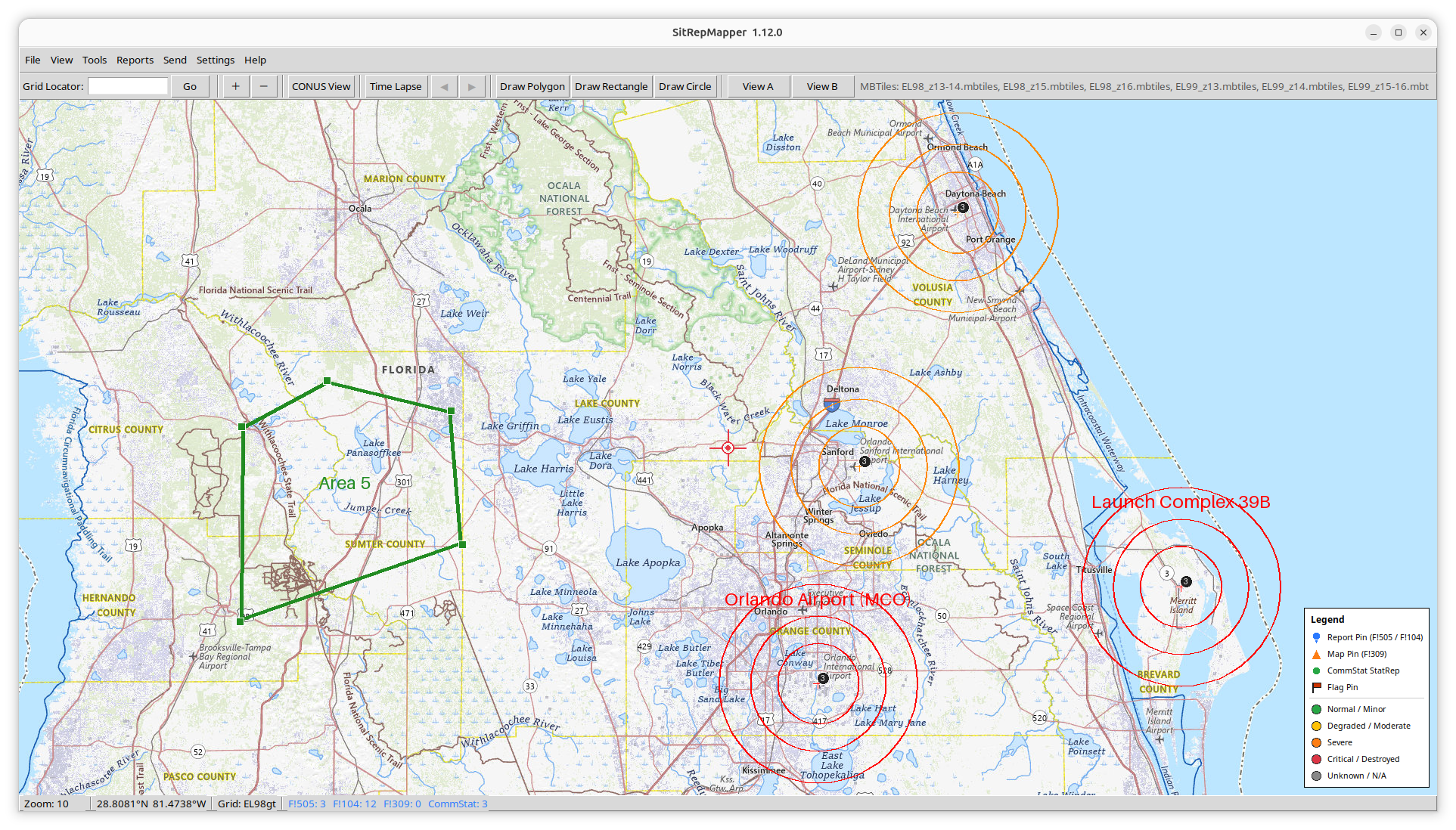
SitRepMapper – polygon and concentric circle overlay. Example: estimated nuclear blast radius. (Click image for high resolution)
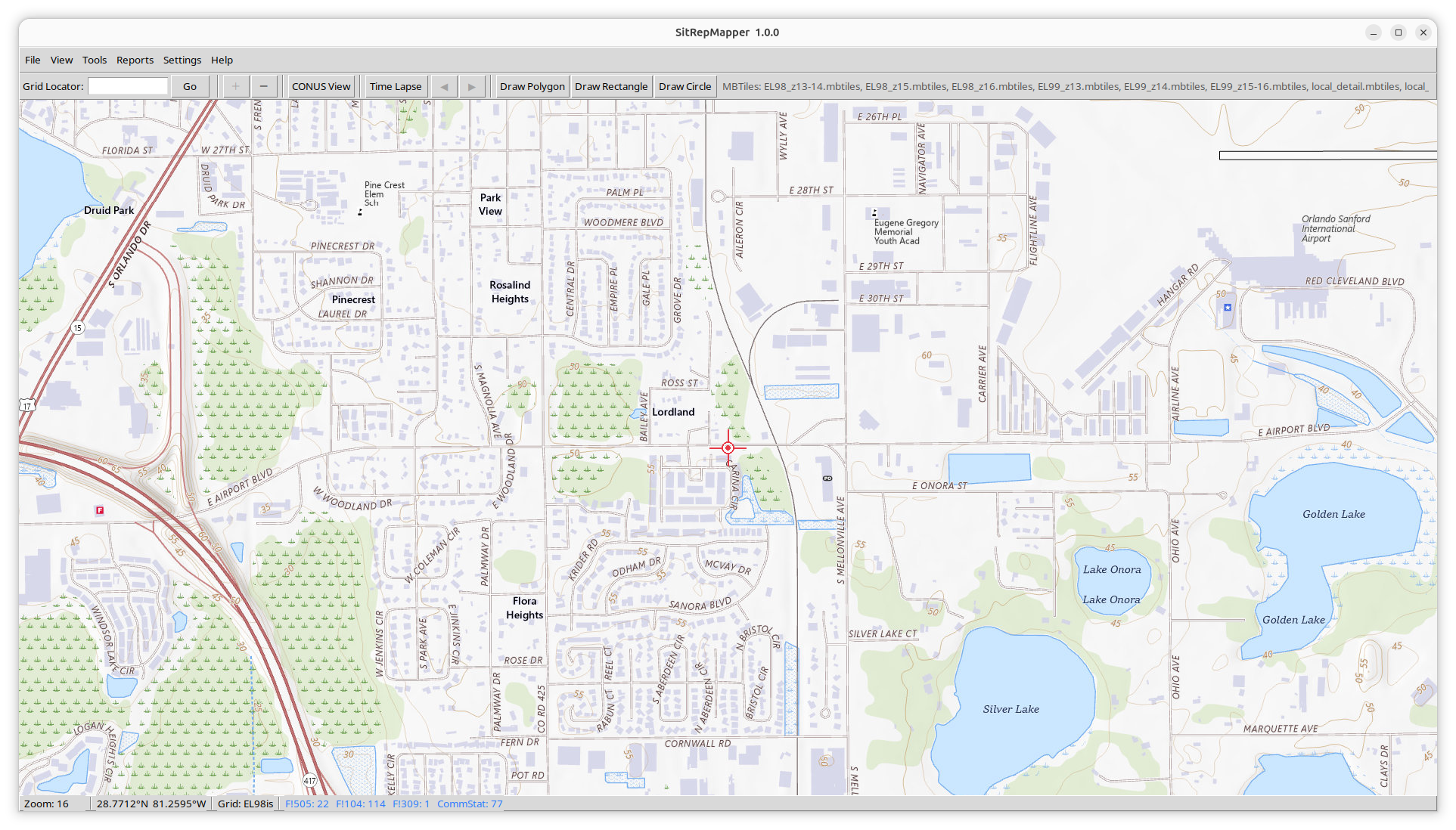
SitRepMapper – Maximum zoom, Level 16. (Click image for high resolution)

SitRepMapper Tool bar (Click image for high resolution)
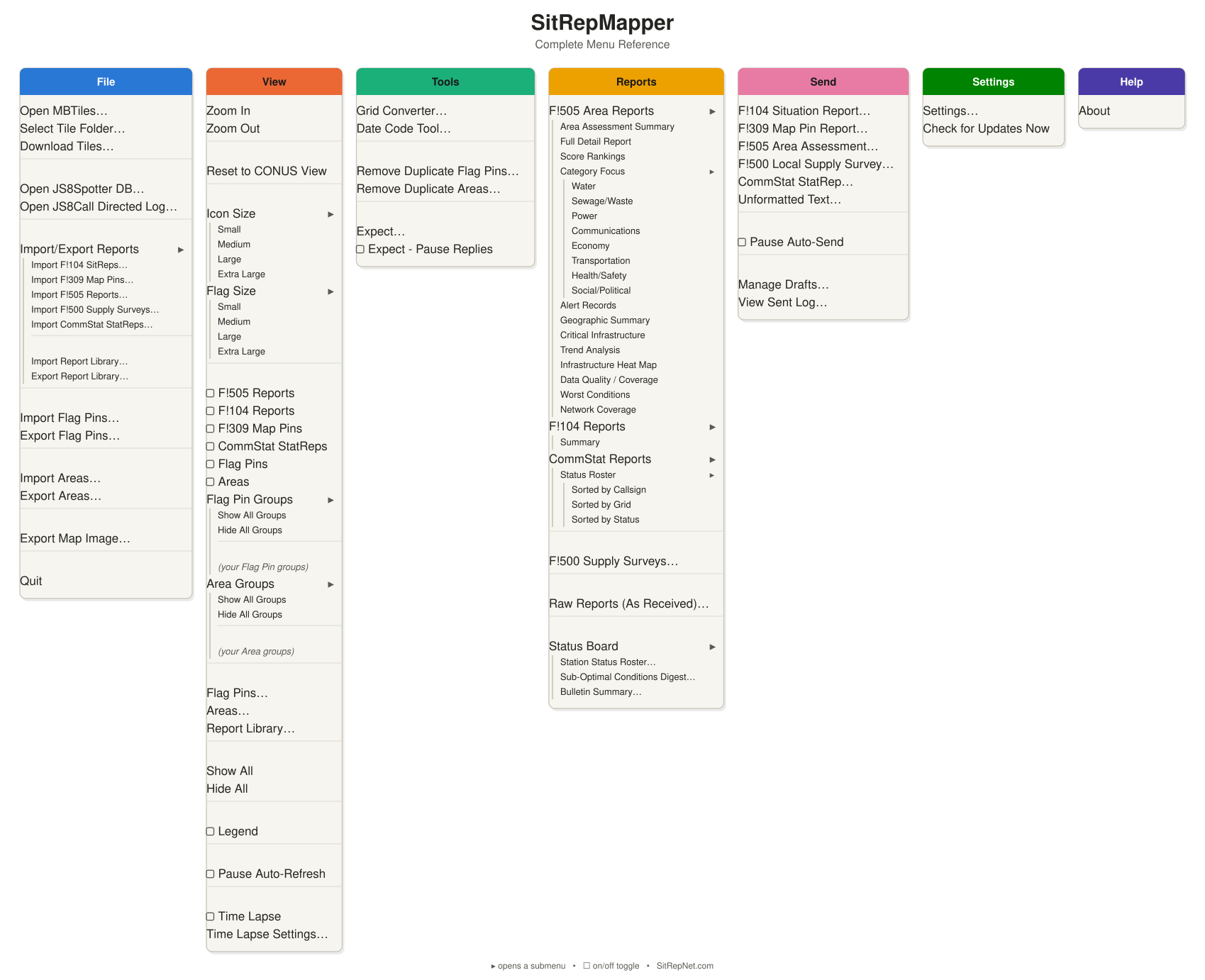
SitRepMapper Menu Diagram (Click image for high resolution)
SitRepMapper reads either JS8Call directly, or JS8Spotter’s SQLite database, plots F!500 Local Supply Survey, F!505 Area Assessment, F!104 Situation Report, F!309 Situation Map Pin, and CommStat StatRep records on a local topo/street tile map, and generates text summary and detail reports — all in one program, fully offline once map tile data is in place.
SitRepMapper both SENDS and RECEIVES:
• F!104 Situation Report
• F!309 Situation Map Pin
• F!500 Local Supply Survey
• F!505 Area Assessment
• CommStat Reports
• Map Flag Pins and Area Markers
Beyond radio use, SitRepMapper is equally suited to conducting an Area Study — building up a working knowledge of what’s in your AO (Area of Operations) — and general information gathering for preparedness groups. The Areas tool (drawn polygons, rectangles, and circles) and Flag Pins (manually-placed markers) exist specifically for this: mark out regions and points of interest on the map, then export them so other members of a local group can import the same data into their own copy of SitRepMapper. No radio connection is required for this use — it works as a standalone offline mapping and area-study tool.
The import and export functions allow for the collection and distribution of reported data via other means, such as FLAMP, email, and VHF/UHF bulletin board systems. Previously received reports are available for download here – Report Files ready for import
SitRepMapper was developed by Stephen Clay McGehee, KN4AM, with the coding done using Claude Code AI.
Platforms – SitRepMapper is Python-based and will run on Windows and Linux, including Raspberry Pi.
Should I use SitRepMapper or JS8Spotter?
Use both or either one, depending on the situation. JS8Spotter offers flexibility and a wide variety of reports, while SitRepMapper offers a tight focus with detailed mapping and analysis. Both can be running at the same time, and both can be run independently. Both programs require a setting change in JS8Call in order to send:
➤ Settings > Reporting tab:
➊ “Enable TCP Server API” — turned ON
➋ “TCP Max Connections” — raised to at least 2
SitRepMapper & JS8Spotter — Safe to Run Together
SitRepMapper is built to coexist with JS8Spotter, not compete with it:
- Read-only access. When using JS8Spotter’s database as a report source, SitRepMapper opens it strictly read-only — it never writes to or locks that database, so it can’t corrupt or interfere with JS8Spotter’s own data.
- No dependency required. SitRepMapper can also read reports directly from JS8Call’s own log file, with no JS8Spotter involvement at all — useful if you’d rather not share a database.
- Sending is separate and optional. SitRepMapper’s own Send feature (off unless you use it) connects to JS8Call’s API alongside JS8Spotter. This just needs JS8Call’s “TCP Max Connections” setting raised above its default of 1, so both programs can hold a connection at the same time — a one-time JS8Call setting, not something SitRepMapper changes on its own.
- Expect auto-replies defer to JS8Spotter. SitRepMapper’s own optional on-air auto-reply feature (off by default) checks JS8Spotter’s Expect configuration before ever replying, so the two never both answer the same request.
In short: SitRepMapper only reads what it needs, and only touches JS8Call’s transmit connection when you explicitly ask it to send or reply — JS8Spotter’s own operation is never disrupted.
Already have SitRepMapper installed? Updating uses the exact same steps as a fresh install — just extract the new ZIP into your existing SitRepMapper folder instead of a new one, overwriting files when prompted, then restart the program. There is no separate update package or procedure. Nothing else to do first.
- Settings, flag pins, and areas are stored in your config folder (~/.config/sitrepmapper/ on Linux/Raspberry Pi, C:\Users\<username>\.config\sitrepmapper\ on Windows), not the program folder, so they are never touched by extracting the ZIP.
- Tile data is not part of the ZIP at all, so your tiles/ folder (or flash drive) is unaffected either way.
- Re-running the pip install step is optional — harmless if nothing changed, only actually needed if the Change Log mentions a new required package.
★ The map tiles are a separate download. If you just install the program and don’t download the map tiles you want to cover, then you’ll just see a blank grey screen. SitRepMapper includes a separate utility that handles downloading the areas and zoom levels you want to cover. Note that as you go to the higher zoom levels, downloading can take a long time. The Tile Downloader User Guide will walk you through the process, but a good start is:
➊ Click the Continental US preset
➋ Set Zoom Min/Max to 5 and 8
➌ Click Estimate to confirm
➍ Start Download
The download will be approximately 22 MB, and will take you down to the state/regional level. You’ll probably want to also download the higher zoom level tiles for your own area. The map tiles are stored separately from the program – typically on a USB flash drive that you can add to as needed. You’ll want to start with a clean formatted drive that is named SRMAP_NA (or a folder named SRMAP_NA) so the program can automatically find it.
See the Change Log for what’s new in this version – 1.17.0.
This software is covered by the standard MIT license, which basically says that you’re free to do with it as you wish. If you want to modify it and then redistribute it, appropriate credit would be appreciated.

Permission is hereby granted, free of charge, to any person obtaining a copy of this software and associated documentation files (the “Software”), to deal in the Software without restriction, including without limitation the rights to use, copy, modify, merge, publish, distribute, sublicense, and/or sell copies of the Software, and to permit persons to whom the Software is furnished to do so, subject to the following conditions:
The above copyright notice and this permission notice shall be included in all copies or substantial portions of the Software.
THE SOFTWARE IS PROVIDED “AS IS”, WITHOUT WARRANTY OF ANY KIND, EXPRESS OR IMPLIED, INCLUDING BUT NOT LIMITED TO THE WARRANTIES OF MERCHANTABILITY, FITNESS FOR A PARTICULAR PURPOSE AND NONINFRINGEMENT. IN NO EVENT SHALL THE AUTHORS OR COPYRIGHT HOLDERS BE LIABLE FOR ANY CLAIM, DAMAGES OR OTHER LIABILITY, WHETHER IN AN ACTION OF CONTRACT, TORT OR OTHERWISE, ARISING FROM, OUT OF OR IN CONNECTION WITH THE SOFTWARE OR THE USE OR OTHER DEALINGS IN THE SOFTWARE.
